Open source · MIT license

Your coding agent can read your code.
It can't see your frontend.

Domscribe maps every DOM node to its exact source location at build time — so your agent knows precisely what to edit.

$npm install -D @domscribe/next
Demo loading...

Works with your stack

ReactVueNext.jsNuxt
Claude CodeCursorGitHub CopilotGemini CLIAmazon Kiro

Any MCP-compatible agent works.

The blind spot

AI coding agents are good at reading and editing source files. But when you ask one to fix a UI bug, it has no idea which file owns the element you're looking at. It guesses, greps, and sometimes edits the wrong thing. Every agent-assisted frontend change is a search problem before it's a coding problem.

> "Make the hero button blue"

✗ Searching for button in src/...
✗ Found 12 files with <button>
✗ Editing src/components/Nav.tsx
  → Wrong file

A source address for every element

Domscribe runs at build time. It walks your JSX and Vue templates, assigns each element a stable ID, and writes a manifest that maps every ID to its exact file, line, and column. Your agent reads the manifest, resolves the element instantly, and edits the right file on the first try.

{
  "id": "A1B2C3D4",
  "file": "src/components/Button.tsx",
  "start": { "line": 12, "column": 4 },
  "tagName": "button",
  "componentName": "Button"
}

Your agent can see what it's editing

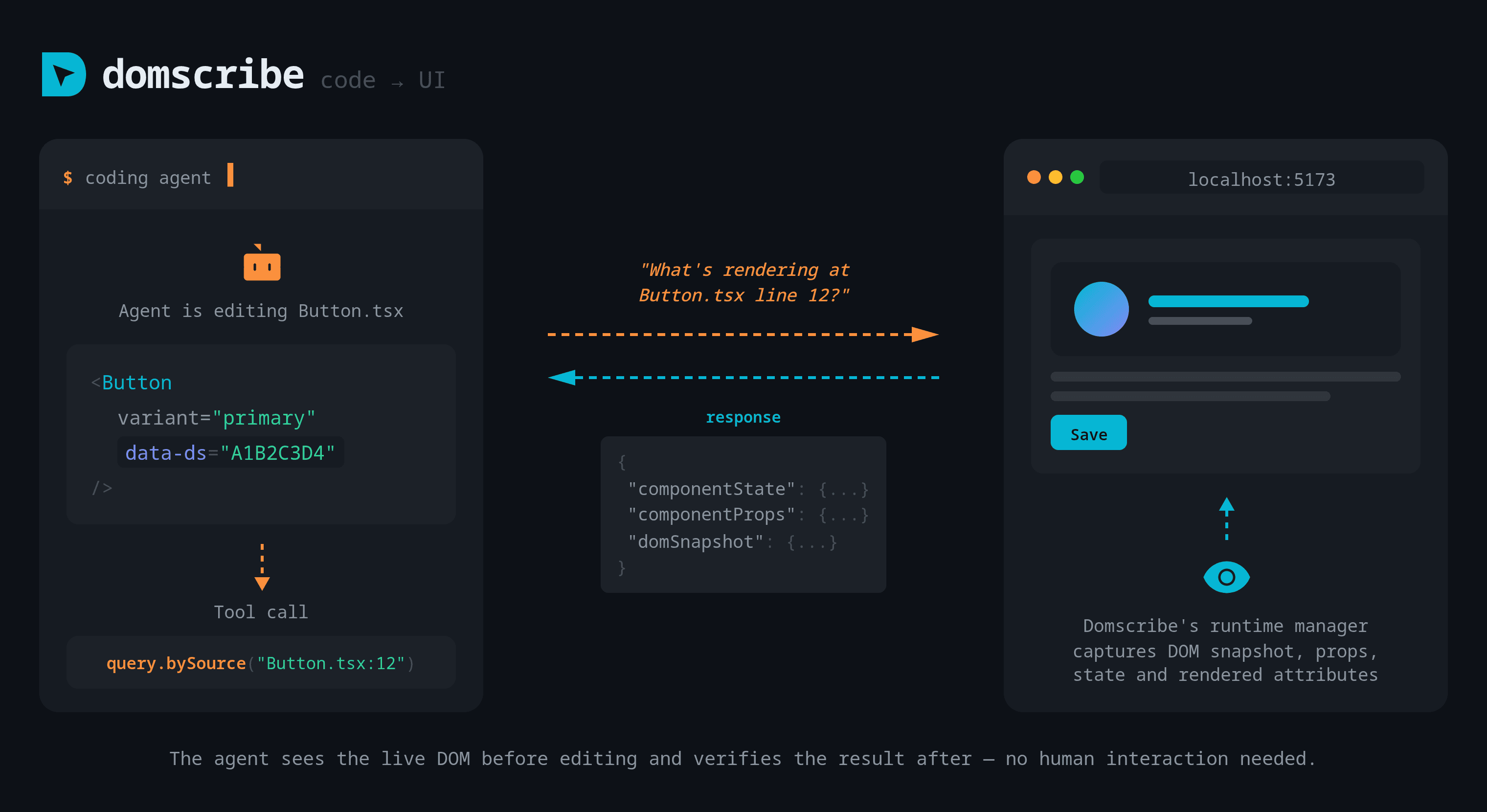
Code to UI — agent queries Domscribe to see what renders at a source location

Before making a change, your agent queries Domscribe to see exactly what's rendering at a given source location — the live DOM snapshot, component props, and state. After editing, it can verify the result. No screenshots, no guessing, no human in the loop.
Point at the UI, describe what you want

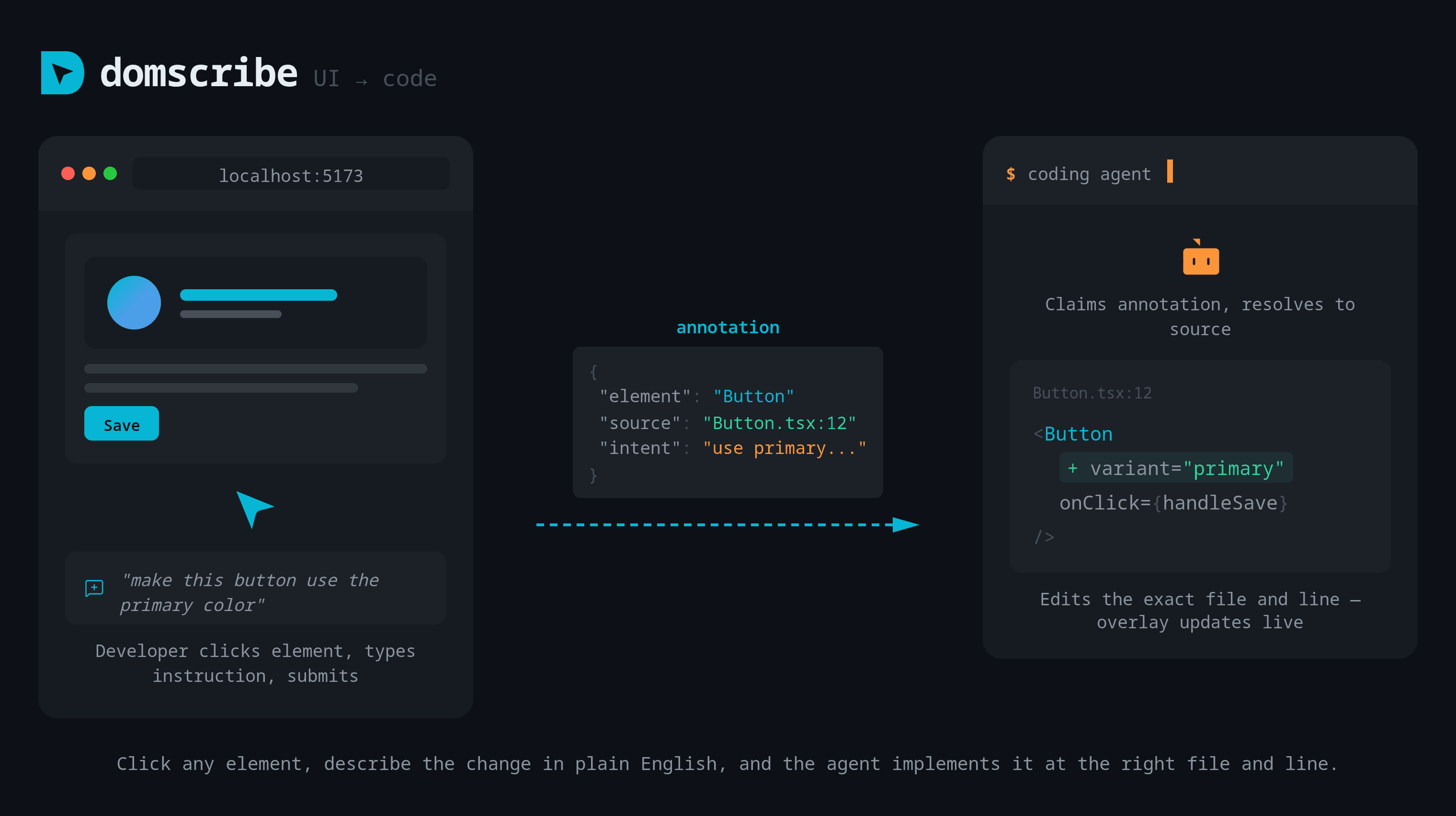
UI to Code — click an element, describe a change, and the agent edits the right file

Click any element in your running app, type a change in plain English, and submit. Domscribe resolves the element to its exact source location and your coding agent edits the right file and line — no searching, no context-switching.

How it works

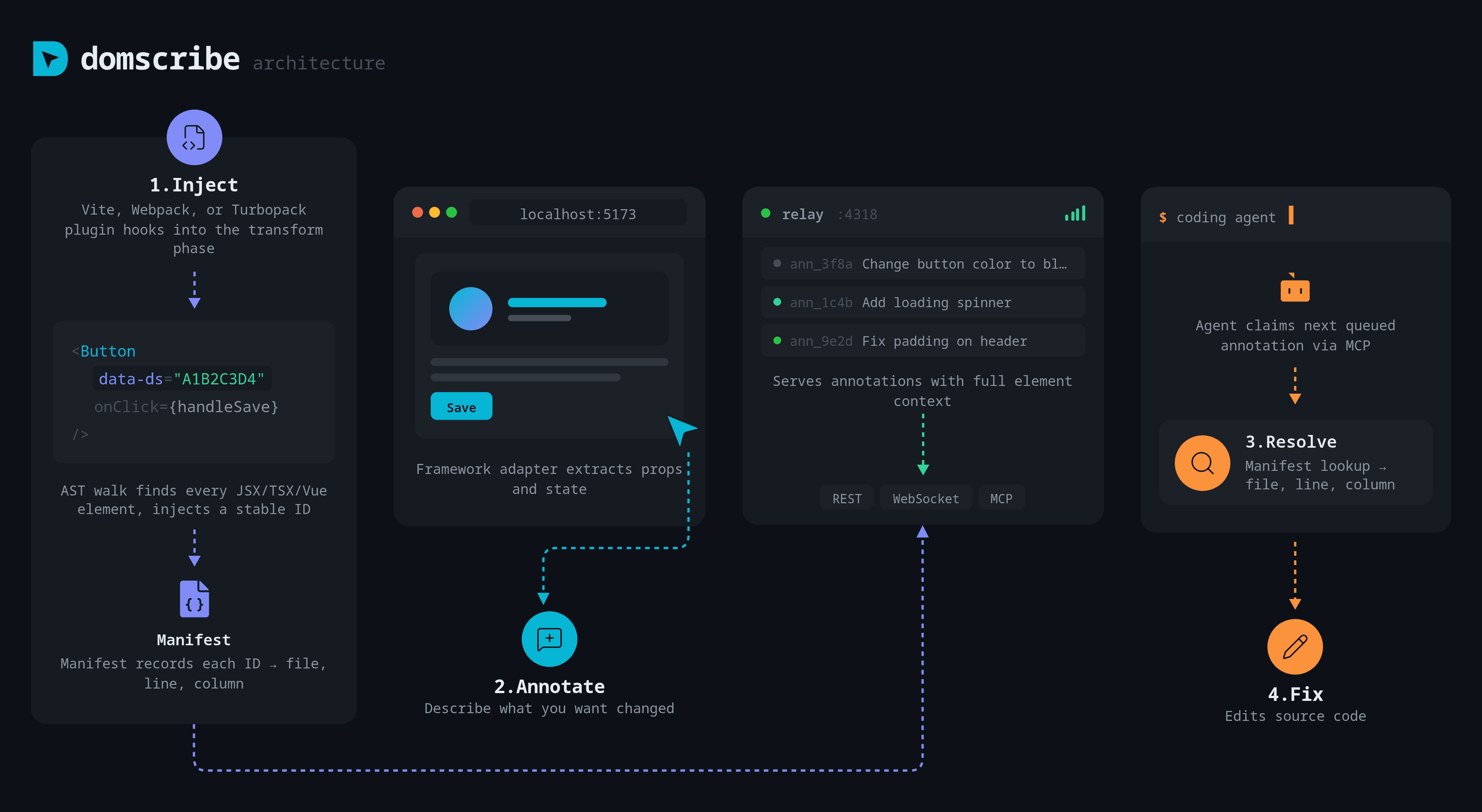
Domscribe architecture — Inject, Annotate, Resolve, Fix

Inject

At build time, DomscribeInjector walks your JSX and Vue templates and injects data-ds="{id}" on every element. IDs are stable across HMR using xxhash64 content hashing.

Annotate & Resolve

Click any element in the overlay, describe what you want changed, and submit. Your coding agent picks it up via MCP, resolves the element ID to its exact source location, and edits the right file.

Zero production impact

All data-ds attributes, overlay scripts, and relay connections are stripped in production builds. Enforced by CI on every fixture. Your users never see any of it.

How Domscribe compares

Verified against each project's source code and npm packages.

FeatureDomscribeStagewiseDevInspector MCPReact GrabFrontman
Build-time stable IDsdata-ds via ASTProxy-based_debugSourceSource maps
DOM→source manifestJSONL, append-only
Runtime props/stateFiber + VNode walkingShallowDOM-levelShallow (bippy)Framework APIs
Multi-frameworkReact · Vue · Next.js · Nuxt · extensibleReact · Vue · AngularReact · Vue · SvelteReact onlyNext.js · Astro · Vite
Multi-bundlerVite · Webpack · TurbopackN/AVite · WebpackN/ADev server only
MCP tools11 tools · 4 promptsPartial9 toolsLightweightBuilt-in agent only
Agent-agnosticAny MCP clientBundled agent
Zero cloud dependencyFully localOAuth + cloud
LicenseMITAGPLOpen sourceOpen sourceApache + AGPL

No single competitor combines build-time stable IDs, deep runtime capture, a DOM→source manifest, and an MCP tool surface in a framework-agnostic way.

Get started in two steps

Step 1 — Add to your app

npm install -D @domscribe/next
next.config.ts
import { withDomscribe } from '@domscribe/next';
export default withDomscribe()(nextConfig);

Step 2 — Connect your agent

/plugin marketplace add patchorbit/domscribe
/plugin install domscribe@domscribe

Installs the Domscribe plugin with MCP config and skills.