How It Works
Domscribe operates in four stages: Inject, Capture, Relay, and Agent. Together they bridge the gap between a running web application and the AI coding agent that edits its source code.
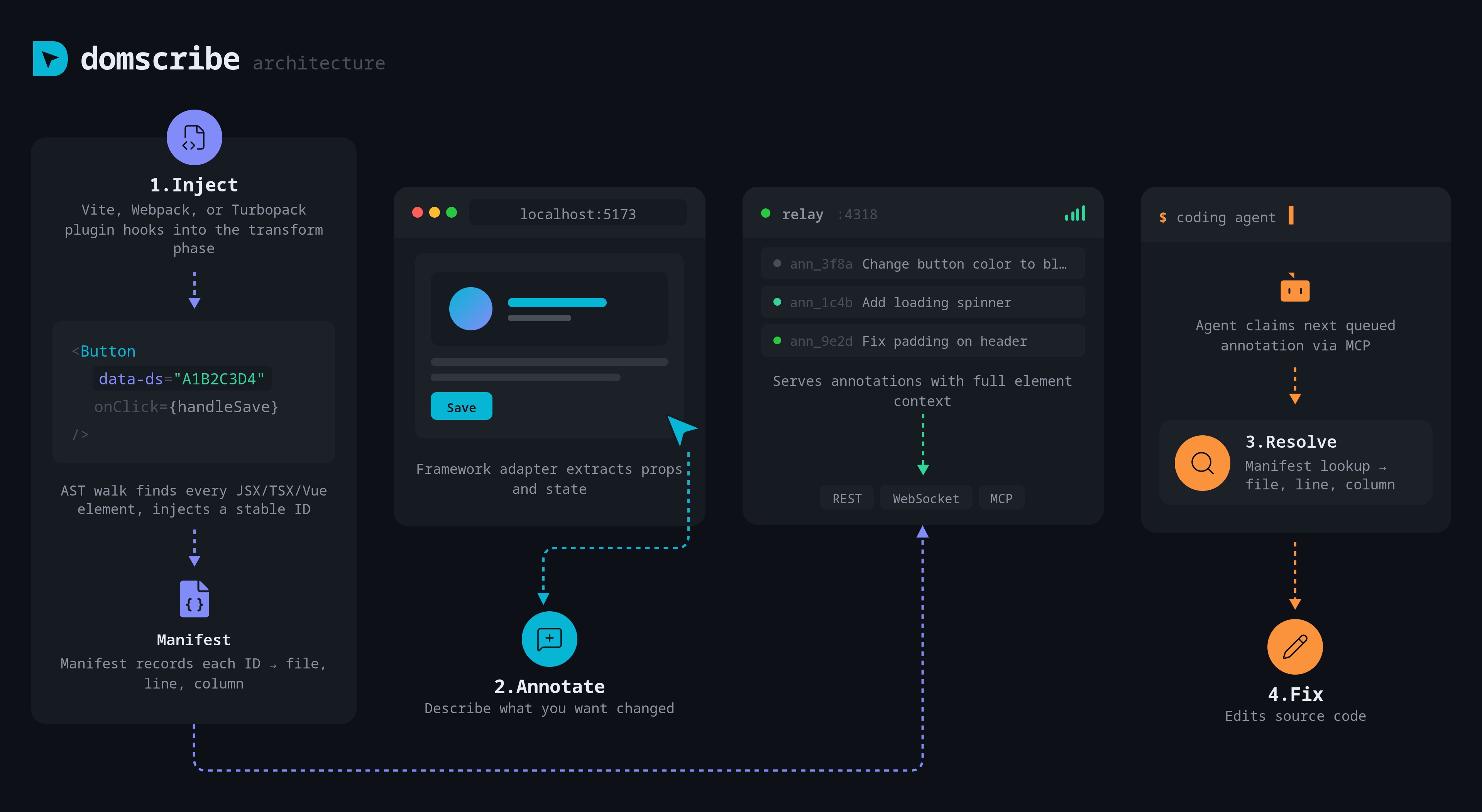
1. Inject
The bundler plugin (Vite, Webpack, or Turbopack) intercepts each source file during development and runs it through Domscribe's AST transform pipeline.
What happens at build time:
- The parser (Acorn for JS/JSX, Babel for TS/TSX, or VueSFC for Vue single-file components) produces an AST.
- The injector walks the AST and finds all JSX opening elements (or Vue template elements).
- For each element that does not already have a
data-dsattribute, the IDStabilizer generates a deterministic ID usingxxhash64(fileContent)combined with a position cache. This ensures IDs are stable across HMR cycles (greater than 80% cache hit rate). - The injector inserts
data-ds="<id>"into the element viamagic-string, preserving source maps. - Each mapping (element ID to file, line, column, tag name, component name) is recorded as a ManifestEntry.
- The BatchWriter buffers entries (50 entries or 100ms flush interval) and appends them to
.domscribe/manifest.jsonl.
The manifest is append-only with hash-based staleness tracking. Each entry carries the xxhash64 of its source file at write time. When a file changes, new entries get a new hash, and readers automatically discard stale entries. The ManifestCompactor periodically removes entries for deleted files.
2. Capture
Framework adapters extract live runtime context from the running application in the browser.
React adapter: Walks the React Fiber tree to extract component props (from fiber.memoizedProps), hook state (traversing the memoizedState linked list), and component metadata. Three capture strategies are available: devtools (uses React DevTools hook), fiber (direct Fiber access), and best-effort (tries multiple strategies).
Vue adapter: Resolves DOM elements to Vue component instances via __vueParentComponent, unwraps reactive proxies (using toRaw/toValue), and supports both Composition API and Options API components.
The overlay UI -- built with Lit web components inside shadow DOM to prevent CSS/JS conflicts with the host application -- lets developers click any element and see its full context: props, state, source location, and component tree.
3. Relay
A localhost Fastify daemon connects the browser and coding agent. It provides three interfaces:
- REST API -- CRUD operations for annotations, manifest queries, and health checks
- WebSocket -- Real-time event broadcasting (annotation changes, manifest updates, bidirectional runtime context queries)
- MCP stdio -- Model Context Protocol server for coding agent tool access
A file lock at .domscribe/relay.lock prevents duplicate daemon instances across dev server restarts. The relay auto-starts when the dev server boots (configurable via relay.autoStart).
4. Agent
The coding agent connects via MCP and uses Domscribe's 12 tools and 4 prompts to interact with the running application.
Code to UI: The agent calls domscribe.query.bySource with a file path and line number. The relay looks up the manifest, sends a CONTEXT_REQUEST to the browser via WebSocket, and returns the live DOM snapshot, props, and state.
UI to Code: A developer clicks an element in the overlay, describes a change, and submits it as an annotation. The agent calls domscribe.annotation.process to atomically claim the next queued annotation, navigates to the source file, implements the change, and responds via domscribe.annotation.respond. The overlay shows the response in real time via WebSocket.
Design Principles
Schema-First Architecture
All data structures are defined as Zod schemas in @domscribe/core. These schemas serve as the single source of truth for validation, TypeScript type inference, and runtime checking across all packages.
Module Boundaries
Dependencies between packages are strictly enforced via @nx/enforce-module-boundaries at lint time:
| Scope Tag | Allowed Dependencies |
|---|---|
scope:core | scope:core |
scope:infra | scope:core, scope:infra |
scope:build | scope:core, scope:infra |
scope:adapter | scope:core, scope:infra, scope:build, scope:adapter |
Zero Production Impact
All Domscribe instrumentation is stripped in production builds. The transform plugin only runs in development mode, the overlay is aliased to a no-op stub in production, and the relay daemon is never started outside of development. This is enforced in CI.
Append-Only JSONL Manifest
The manifest uses an append-only JSONL format for crash safety. Instead of rewriting the file on every change, new entries are appended. Hash-based staleness tracking (two-pass read algorithm) ensures only the latest entries per file are considered valid. Compaction runs periodically to garbage-collect stale entries.
RFC 7807 Error System
All errors across the system follow the RFC 7807 Problem Details format via DomscribeError, providing structured error codes, titles, details, and HTTP status codes for consistent error handling.